
Visual Studio Code plugin that autocompletes filenames.
In the command palette (cmd-shift-p) select Install Extension and choose Path Intellisense.
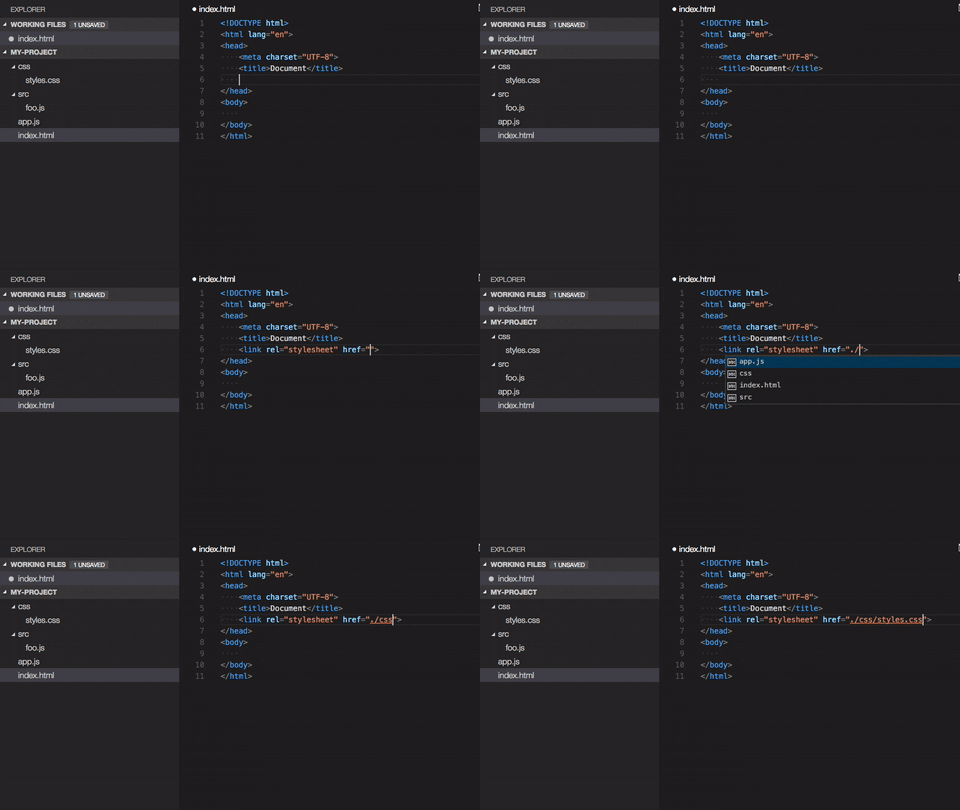
Use npm intellisense
Something missing? Found a bug? - Create a pull request or an issue. Github
Path Intellisense removes the file extension by default if the statement is a import statement. To enable file extensions set the following setting to true:
{
	"path-intellisense.extensionOnImport": true,
}- v1.0.2 - Fixed Bug #15 #16
- v1.0.1 - Fixed compatibility with VS Code 1.3
- v1.0.0 - Added .. on top of each suggestion, Removed trailing slash, bugs fixed
- v0.2.0 - Remove file extension within imports (configurable)
- v0.1.0 - Added slash after folders, group by folder and files, file icon
- v0.0.5 - Fixed windows path issue
- v0.0.3 - Fixed unknown publisher issue
- v0.0.2 - Updated Readme.md
- v0.0.1 - Initial
This software is released under MIT License