

The fastest open-source spreadsheet engine.
A million formulas in 0.26 seconds.
Rust, Python and JavaScript — on servers, in browsers and at the edge.
Load Excel workbooks, change inputs, recalculate and read results, in-process. Built for AI agents.


Calculating a spreadsheet from code usually means automating an office suite: LibreOffice over UNO, Excel over COM, or Excel Online through Microsoft Graph and a subscription. They are heavy to deploy, slow to start, hard to sandbox and awkward to hand to an agent. Formualizer is a library instead.
- Runs anywhere. One Rust core, shipped as a Rust crate, a Python package (including Pyodide) and a WASM module for browsers, Node and edge runtimes. No external process, no Windows, no license server.
- Built for agents. Deterministic evaluation (injectable clock, timezone and random seed), an auditable change log with undo, typed inputs and outputs through SheetPort, and agent-spreadsheet for CLI and MCP tooling.
- No compromise on speed. Copied formulas compute as families in one pass over Arrow columns, lookups index their table once, and only what changed recalculates. The numbers are below.
- Excel-compatible. 400+ functions, dynamic arrays,
LETandLAMBDA, with edge cases checked against Excel.
Already editing .xlsx files with openpyxl or another tool? Keep that editor, then let formualizer recalc fill the formula caches it leaves empty or stale. Formula text, styles and the rest of the package are preserved.
pip install formualizer        # or: uvx formualizer recalc book.xlsx
npm i -g @formualizer/cli      # or: npx @formualizer/cli recalc book.xlsx
cargo binstall formualizer-cli # or: cargo install formualizer-cli
Prebuilt archives for Linux, macOS and Windows are attached to each GitHub release.
python edit_model.py                      # your editor saves book.xlsx
formualizer recalc book.xlsx --json       # recalc last; exit 0 ok, 2 refused
python -c "import openpyxl; print(openpyxl.load_workbook('book.xlsx', data_only=True).active['B1'].value)"
Branch on the exit code, inspect errors, fix inputs or formulas and repeat; exit 2 means refused, not recalculated. Recalc must be the last writing step: saving with openpyxl afterwards drops caches again. See the Recalc CLI docs, the CLI reference and the portable agent skill.
Load an .xlsx and calculate every formula in a fresh workbook. Formualizer 0.13.0 versus LibreOffice Calc 24.2, the usual open-source way to do this, on the same shared 24-thread Linux machine, median of 3 runs. Formualizer was measured again on current code; LibreOffice's saved baseline is unchanged.

Across all 52 workbooks and workloads, Formualizer takes about a fifth of the time and is faster in 50. The overall time ratio is 0.184× (geometric mean). Native release measurements are from October 25, 2026; the saved LibreOffice baseline is from September 29. These shared-machine results are indicative, not guarantees for every workbook or runtime.
Exact timings and workload descriptions
Speedups use unrounded measurements; displayed times are rounded. Each case uses the median of three load-plus-first-calculation totals. Formualizer uses the native reader in interactive mode, one fresh process per sample. LibreOffice runs headless with threaded calculation and OpenCL off; listener startup is excluded, and import may itself calculate uncached formulas. Filesystem caches are warm. This is a fresh native run against a saved baseline, not a newly interleaved A/B.
| Workload | LibreOffice 24.2 | Formualizer 0.13.0 | |
|---|---|---|---|
| Product lookups [1] | 53.2 s | 0.22 s | 244× faster |
| Sales report joins [2] | 19.7 s | 0.33 s | 61× faster |
| Enron cash-flow forecast [3] | 1.57 s | 0.06 s | 26× faster |
| Multi-criteria summary report [4] | 6.11 s | 0.22 s | 28× faster |
| Revenue rollup [5] | 4.46 s | 0.41 s | 11× faster |
| Service operations model [6] | 212 ms | 45 ms | 4.7× faster |
| Enron trading workbook [7] | 1.31 s | 288 ms | 4.5× faster |
| 100,000-row running balance [8] | 525 ms | 193 ms | 2.7× faster |
| 100,000 copied formulas [9] | 550 ms | 239 ms | 2.3× faster |
- 20,000 query rows, each with two
INDEX/MATCHlookups of a product key in a 50,000-row table. - A 5,000-row report that finds each sale in a 50,000-row fact table on another sheet, then looks up its region and product in two dimension tables (
INDEX/MATCHthroughout). The fact table computes 50,000 revenue formulas. - A cash-flow forecast from the public Enron spreadsheet corpus: about 4,900 formulas across 18 sheets.
- 1,000
COUNTIFSrows, each counting 100,000 transactions against five conditions. - 100,000 line items (price × quantity) rolled up by 1,000
SUMIFSover whole columns. - A generated operations workbook: work orders, priority lookup tables and dashboard rollups (15,000 formulas).
- A trading-volume workbook from the Enron corpus: 65,000 formulas across 16 sheets.
- A balance where each row adds to the one above (
=A1+1,=A2+1, …), the hardest shape to parallelize. - One formula (
=A1*2) filled down 100,000 rows, plus aSUMover the results.
The two exceptions are the 100,000-unique-formula witness and one Enron financial model (Mesa_Model_1_19_01), where LibreOffice is 1.2× and 2.6× faster, respectively.
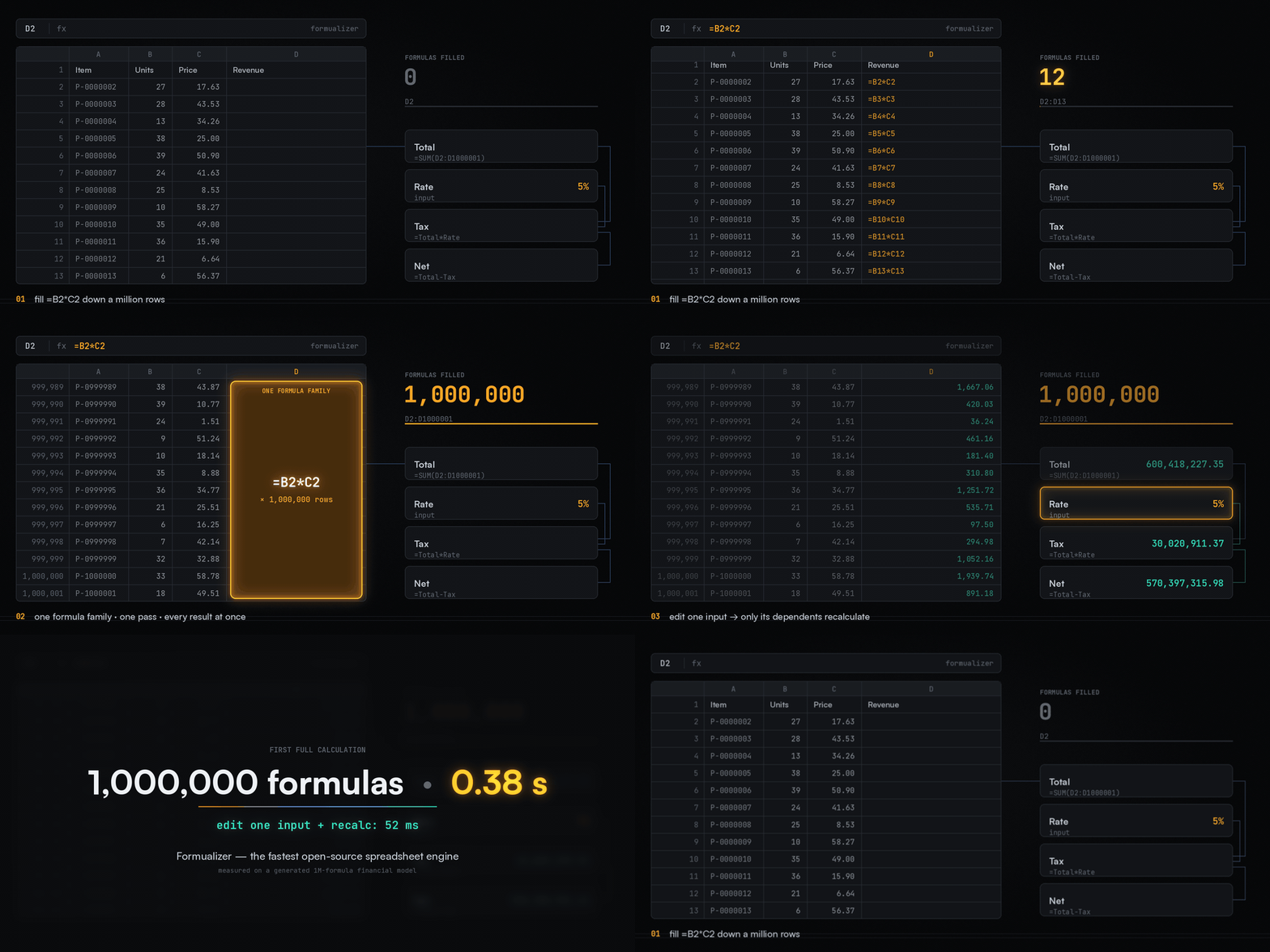
Illustrative animation, not a real-time recording. The generated million-formula financial model calculated in 0.26 seconds after a separate 2.58-second load; changing one input and recalculating took 48 ms (native release build, ephemeral mode, median of 3 runs).
- Copied formulas are one unit. Fill a formula down 100,000 rows and Formualizer stores one template and one dependency node, and evaluates the run in one pass over typed Apache Arrow columns. It does not track 100,000 separate formulas.
- Lookups and conditional sums index their table once. A column of
VLOOKUP,INDEX/MATCH,SUMIFSorCOUNTIFSover the same range builds one index for the whole run instead of scanning the table once per row. - Only what changed recalculates. Dependencies are tracked by region, so editing one input touches only the cells that read it. Row and column inserts move whole runs at once.
- Exact results. The fast paths reproduce Excel's per-cell semantics bit for bit, including summation order, error precedence and number formats. The cell-by-cell engine stays in the codebase as a test oracle.
pip install formualizerimport formualizer as fz
wb = fz.load_workbook("financial_model.xlsx")
wb.set_value("Assumptions", 3, 2, 0.07) # change an input (B3)
wb.evaluate_all() # recalculates only what depends on it
print(wb.get_value("Summary", 5, 2)) # read an output (B5)The native XLSX reader is the default in 0.13. See the migration guide for integrations using legacy Calamine names.
[dependencies]
formualizer = { version = "0.13", features = ["xlsx-recalc"] }
use formualizer::workbook::{NativeXlsxAdapter, SpreadsheetReader};
use formualizer::{LiteralValue, LoadStrategy, Workbook, WorkbookConfig};
let reader = NativeXlsxAdapter::open_path("financial_model.xlsx")?;
let mut wb = Workbook::from_reader(reader, LoadStrategy::EagerAll, WorkbookConfig::ephemeral())?;
wb.set_value("Assumptions", 3, 2, LiteralValue::Number(0.07))?;
wb.evaluate_all()?;
println!("{:?}", wb.get_value("Summary", 5, 2));npm install formualizerimport init, { Workbook } from 'formualizer';
await init();
const wb = new Workbook();
wb.addSheet('Loans');
wb.setValue('Loans', 1, 1, 250000); // principal
wb.setValue('Loans', 2, 1, 0.045); // annual rate
wb.setValue('Loans', 3, 1, 360); // months
wb.setFormula('Loans', 1, 2, '=PMT(A2/12, A3, -A1)');
console.log(wb.evaluateCell('Loans', 1, 2)); // ~1266.71More in the quickstarts for Rust, Python, Pyodide and JS/WASM.
| 400+ Excel functions | Math, text, lookup (XLOOKUP, VLOOKUP, INDEX/MATCH), date and time, statistics, financial, database, engineering, with edge cases checked against Excel. |
| Dynamic arrays | FILTER, UNIQUE, SORT, SORTBY, SEQUENCE, LET, LAMBDA, with spill semantics |
| Real workbooks | Load and write XLSX (native reader, umya writer), CSV and JSON. Defined names, tables and cross-sheet references. |
| Incremental recalculation | Change an input and only its dependents recalculate. Cycle detection, iterative calculation and optional parallel evaluation. |
| Undo / redo | A transactional change log with action grouping, rollback and replay |
| SheetPort | Treat a spreadsheet as a typed function: inputs and outputs declared in code or YAML, validated |
| Custom functions | Register workbook-local functions from Rust, Python or JavaScript, or load WASM plugins |
| Permissive license | MIT or Apache-2.0: no AGPL, no commercial license needed |
- Financial models as services. Run pricing, lending, insurance and planning workbooks server-side, with no Excel install and no office suite to babysit.
- AI agents that work with spreadsheets. Deterministic evaluation, an auditable change log and typed I/O. See agent-spreadsheet.
- Products with spreadsheet logic inside. Calculators, configurators and planning tools that run formulas in the browser or on the server, without shipping a spreadsheet UI.
- Data pipelines. Business logic trapped in spreadsheets, turned into reproducible, testable code paths.
| Library | Language | Parse | Evaluate | Write XLSX | Functions | Incremental recalc | License |
|---|---|---|---|---|---|---|---|
| Formualizer | Rust / Python / WASM | Yes | Yes | Yes | 400+ | Yes | MIT / Apache-2.0 |
| HyperFormula | JavaScript | Yes | Yes | No | ~400 | Yes | AGPL-3.0 or commercial |
| calamine | Rust | No | No | No | n/a | n/a | MIT / Apache-2.0 |
| openpyxl | Python | No | No | Yes | n/a | n/a | MIT |
| xlcalculator | Python | Yes | Yes | No | ~50 | Partial | MIT |
| formulajs | JavaScript | No | Yes | No | ~100 | No | MIT |
- HyperFormula is the closest embeddable competitor, but AGPL-3.0 requires you to open-source your application or buy a commercial license.
- calamine and openpyxl read (and, for openpyxl, write) XLSX, but don't evaluate formulas.
Formualizer is the engine. For an agent that works with workbooks (read, profile, edit, recalculate, diff and verify them safely), use agent-spreadsheet, the agent tooling layer built on it:
your agent / app
      │
agent-spreadsheet     CLI (`agent-spreadsheet` / `asp`) · MCP server · JS SDK
      │
  formualizer         parsing · dependency tracking · 400+ functions · recalc
- CLI: one-shot reads, safe edits, recalculation and verifiable diffs for shell-native agents and CI (
npm i -g agent-spreadsheetorcargo install agent-spreadsheet). - MCP server: stateful multi-turn sessions with workbook forks, checkpoints, staged edits and native recalculation.
- JS SDK: a typed API for app integrations, backed by the MCP server or an embedded in-process WASM engine.
Every edit is recalculated with this engine, and is traceable and diffable. That is the difference from screenshot-driven UI automation, or MCP servers that can't compute a formula.
SheetPort turns a workbook into a function. A manifest names its input and output cells with their types and constraints; a session writes validated inputs, recalculates and returns typed outputs. Build the manifest in code, as here, or ship it as a YAML file next to the workbook.
import formualizer as fz
from formualizer.sheetport import Input, Manifest, Output

# The model: B4 computes the monthly payment from B1:B3.
wb = fz.Workbook()  # or fz.load_workbook("loan.xlsx")
wb.add_sheet("Calculator")
wb.set_formula("Calculator", 4, 2, "=PMT(B2/12, B3, -B1)")

manifest = Manifest(
    "loan-calculator",
    name="Loan calculator",
    ports=[
        Input("principal", "Calculator!B1", type="number", constraints={"min": 0}),
        Input("rate", "Calculator!B2", type="number"),
        Input("term_months", "Calculator!B3", type="integer"),
        Output("monthly_payment", "Calculator!B4", type="number"),
    ],
)

session = fz.SheetPortSession(wb, manifest)
session.write_inputs({"principal": 250_000, "rate": 0.045, "term_months": 360})
outputs = session.evaluate_once(freeze_volatile=True)
print(outputs["monthly_payment"])  # 1266.71...
Inputs are checked before anything is written: {"principal": -1} raises SheetPortConstraintError and leaves the workbook unchanged. Besides single cells, ports can be ranges, records and tables, located by A1 address, defined name or the rows under a header.
The same in JavaScript and Rust
import init, { Workbook, SheetPortSession, defineManifest } from 'formualizer';
await init();

// The model: B4 computes the monthly payment from B1:B3.
const wb = new Workbook();
wb.addSheet('Calculator');
wb.setFormula('Calculator', 4, 2, '=PMT(B2/12, B3, -B1)');

const manifest = defineManifest({
  id: 'loan-calculator',
  name: 'Loan calculator',
  ports: [
    { id: 'principal', dir: 'in', location: 'Calculator!B1', type: 'number', constraints: { min: 0 } },
    { id: 'rate', dir: 'in', location: 'Calculator!B2', type: 'number' },
    { id: 'term_months', dir: 'in', location: 'Calculator!B3', type: 'integer' },
    { id: 'monthly_payment', dir: 'out', location: 'Calculator!B4', type: 'number' },
  ],
});

const session = SheetPortSession.fromManifest(manifest, wb);
session.writeInputs({ principal: 250000, rate: 0.045, term_months: 360 });
const outputs = session.evaluateOnce({ freezeVolatile: true });
console.log(outputs.monthly_payment); // 1266.71...
use formualizer::sheetport::{EvalOptions, InputUpdate, PortValue, SheetPortSession};
use formualizer::sheetport_spec::{Constraints, Manifest, Port, ValueType};
use formualizer::{LiteralValue, Workbook};
// The model: B4 computes the monthly payment from B1:B3.
let mut wb = Workbook::new(); // or load one from an .xlsx
wb.add_sheet("Calculator")?;
wb.set_formula("Calculator", 4, 2, "=PMT(B2/12, B3, -B1)")?;
let manifest = Manifest::new("loan-calculator")
.with_name("Loan calculator")
.port(
Port::input("principal", "Calculator!B1", ValueType::Number).with_constraints(
Constraints {
min: Some(0.0),
..Default::default()
},
),
)
.port(Port::input("rate", "Calculator!B2", ValueType::Number))
.port(Port::input(
"term_months",
"Calculator!B3",
ValueType::Integer,
))
.port(Port::output(
"monthly_payment",
"Calculator!B4",
ValueType::Number,
));
let mut session = SheetPortSession::new(wb, manifest)?;
session.write_inputs(InputUpdate::from_iter([
("principal", LiteralValue::Number(250_000.0)),
("rate", LiteralValue::Number(0.045)),
("term_months", LiteralValue::Int(360)),
]))?;
let outputs = session.evaluate_once(EvalOptions {
freeze_volatile: true,
..Default::default()
})?;
let payment = outputs
.get("monthly_payment")
.and_then(PortValue::as_scalar);
println!("{payment:?}"); // Some(Number(1266.71...))The same manifest as YAML
spec: fio
spec_version: "0.3.0"
manifest:
  id: loan-calculator
  name: Loan calculator
ports:
  - id: principal
    dir: in
    shape: scalar
    location: { a1: "Calculator!B1" }
    schema: { type: number }
    constraints: { min: 0 }
  - id: rate
    dir: in
    shape: scalar
    location: { a1: "Calculator!B2" }
    schema: { type: number }
  - id: term_months
    dir: in
    shape: scalar
    location: { a1: "Calculator!B3" }
    schema: { type: integer }
  - id: monthly_payment
    dir: out
    shape: scalar
    location: { a1: "Calculator!B4" }
    schema: { type: number }
session = fz.SheetPortSession.from_manifest_yaml(yaml_text, wb)In JavaScript use SheetPortSession.fromManifestYaml(yaml, wb); in Rust, Manifest::from_yaml_str(&yaml). A manifest built in code and one loaded from YAML are the same structure; Manifest.to_yaml() in Python and Manifest::to_yaml in Rust write one out.
Use it for financial models served as APIs, agent tools, configuration-driven business logic and batch scenario runs. See the SheetPort guide and the manifest format.
Register workbook-local functions in any host:
- Rust:
register_custom_function - Python:
register_function - JavaScript:
registerFunction
The rules are the same everywhere:
- Names are case-insensitive.
- Custom functions resolve before built-ins; overriding a built-in requires opting in.
- Range arguments arrive as 2-D arrays, and returning an array spills.
- A failing callback becomes a spreadsheet error.
The Rust workbook can also load sandboxed WASM plugins (features wasm_plugins and wasm_runtime_wasmtime).
Runnable examples:
cargo run -p formualizer-workbook --example custom_function_registration
python bindings/python/examples/custom_function_registration.py
cd bindings/wasm && npm run build && node examples/custom-function-registration.mjs
cargo run -p formualizer-workbook --features wasm_runtime_wasmtime --example wasm_plugin_inspect_attach_bindformualizer <-- recommended: batteries-included re-export
formualizer-workbook <-- workbook API, sheets, undo/redo, XLSX/CSV/JSON I/O
formualizer-eval <-- calculation engine, dependency authority, built-ins
formualizer-parse <-- tokenizer, parser, AST, pretty-printer
formualizer-common <-- shared types (values, errors, references)
formualizer-sheetport <-- SheetPort runtime (spreadsheets as typed APIs)
| Crate | Use it when |
|---|---|
formualizer |
Default: re-exports the workbook, engine and SheetPort behind feature flags |
formualizer-workbook |
You want the full workbook: sheets, I/O, undo/redo, batch operations |
formualizer-eval |
You own the data model and want only the calculation engine, with custom resolvers |
formualizer-parse |
You need only formula parsing, tokenizing, AST analysis or pretty-printing |
| Target | Install | Docs |
|---|---|---|
| Rust | cargo add formualizer |
docs.rs · guide |
| Python | pip install formualizer |
README · guide |
| Python (Pyodide) | await micropip.install(wheel_url) |
README · guide |
| WASM | npm install formualizer |
README · guide |
wasm-js: the browser and Node runtime used by theformualizernpm package, withperformance.now(), JS entropy and wall-clock time.portable-wasm: no JS imports, safe for rawwasm32-unknown-unknownhosts such as wasmtime. Time functions default to the UTC epoch unless you inject a clock (FixedClockor aClockProvider).
formualizer = { version = "0.13", default-features = false, features = ["portable-wasm"] }Native Rust needs no feature selection.
formualizer.dev has the full documentation:
- Function reference
- the interactive formula parser
- Core concepts
- Large workbook performance
Contributions are welcome. Browse the open issues, or open one to discuss a proposal. Excel-compatibility fixes that come with a before-and-after table measured in Excel are especially appreciated.
cargo test --workspace
cd bindings/python && maturin develop && pytest
cd bindings/wasm && wasm-pack build --target bundler && wasm-pack test --nodeDual-licensed under MIT or Apache-2.0, at your option.