
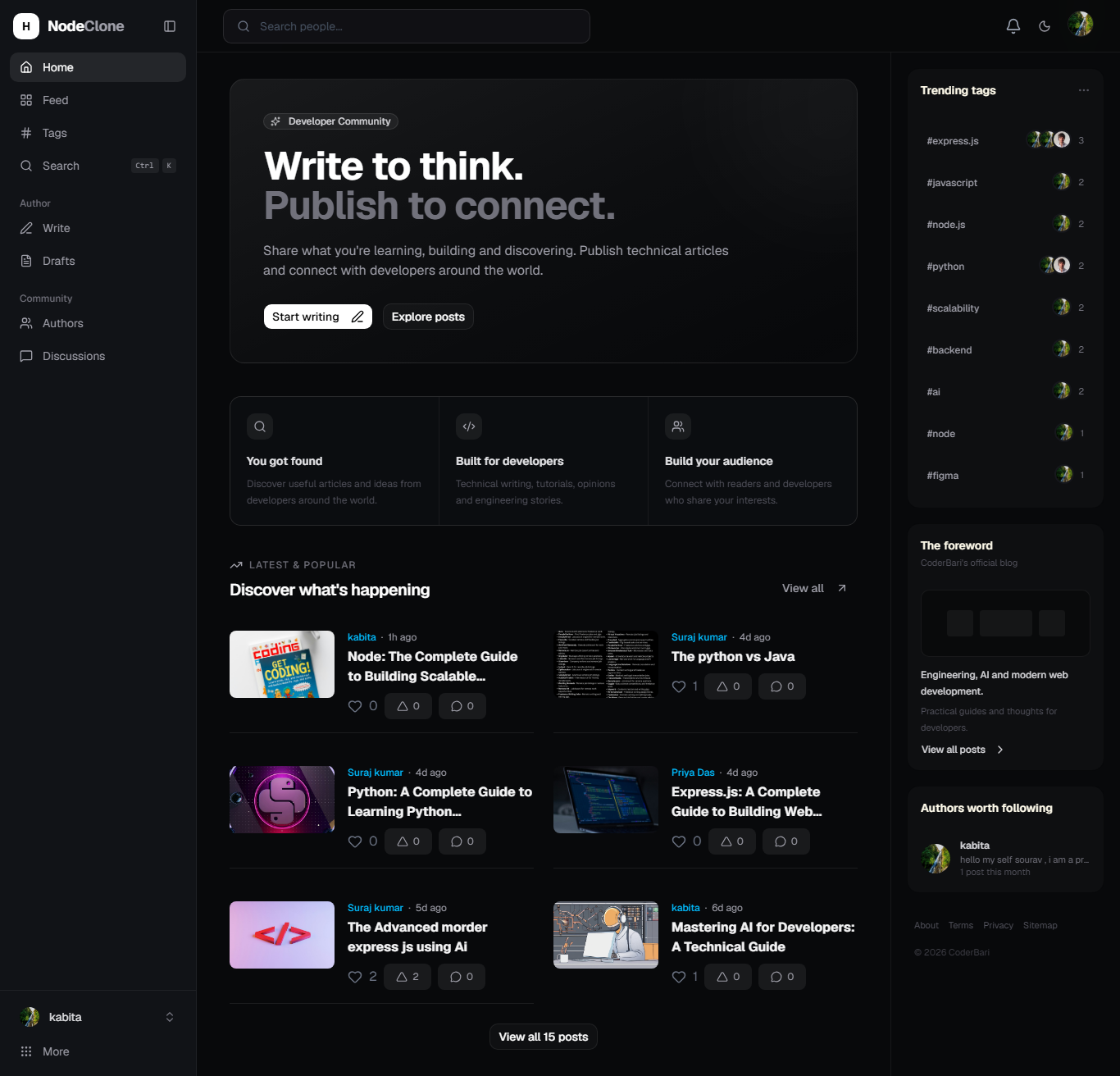
A full-stack developer blogging and publishing platform inspired by Hashnode, built with the MERN stack. The application provides developer-focused publishing workflows including authentication, Markdown-based post creation, drafts and publishing, tags, search, social interactions, comments, bookmarks, notifications, real-time updates, media handling, and AI-assisted content generation.
🚀 A full-stack developer blogging and publishing platform built during my Full Stack Development Internship at Internmo Pvt. Ltd.






Frontend:
https://hashnode-clone-developer-blogging-p.vercel.app
Backend:
https://hashnode-clone-developer-blogging-p-snowy.vercel.app
This project was developed during a Full Stack Development internship at Internmo. The work provides practical exposure to building an end-to-end web application using React, Node.js, Express, MongoDB, REST APIs, authentication, cloud services, AI integrations, and real-time communication.
Internmo describes its internship programs as practical, project-based experiences designed to provide hands-on exposure through real-world projects. Its Full Stack Development internship track covers technologies including React/Next.js, Node.js, REST APIs, databases, and deployment pipelines.
Internmo website: https://internmo.com/
This project recreates the core experience of a developer-oriented blogging platform where users can create profiles, write technical articles, save drafts, publish posts, organize content with tags, interact with other developers, and discover content through search.
The application follows a client-server architecture:
- Frontend: React application built with Vite
- Backend: Express.js REST API
- Database: MongoDB with Mongoose
- Authentication: JWT-based authentication
- Media: Cloudinary and Unsplash integration
- AI: Cloudflare Workers AI for the active AI text/image routes
- Real-time communication: Socket.IO
The repository is organized into separate client and server applications.
- User registration
- User login
- JWT authentication
- Protected frontend routes
- Protected API routes
- Current-user retrieval
- Password hashing with bcrypt
- Seven-day JWT expiration
- User profiles
- Profile information
- Bio and location
- Avatar
- GitHub, LinkedIn, X, and website links
- Profile editing
- Account deletion
- Followers/following information
- Create blog posts
- Edit posts
- Delete posts
- Draft posts
- Published posts
- Post slugs
- Excerpts
- Markdown editor
- Post cover images
- Tags
- Personal post dashboard
Authenticated users can use AI assistance for:
- Blog title generation
- Tag generation
- Article content generation
- Excerpt generation
- AI-generated cover images
The current AI routes use Cloudflare Workers AI. The repository also contains a Gemini image-generation service, but that service is separate from the currently wired AI route controller.
- Published post search
- User search
- Tag search
- Global search interface
- Trending authors
- Tag pages
- Post discovery through feeds
- Follow users
- Unfollow users
- Follow tags
- Unfollow tags
- Followers
- Likes
- Upvotes
- Bookmarks
- Comments
- Comment replies
- Comment editing/deletion
- Notifications
Socket.IO is used for real-time application updates, including:
- Comment creation/update/delete events
- Post like updates
- Post upvote updates
- Follow updates
- New notifications
- Authenticated socket connections
- Post rooms
- User rooms
- Tag rooms
- User avatar uploads
- Blog cover image uploads
- In-memory Multer processing
- Cloudinary uploads
- Unsplash image search
- Unsplash attribution metadata
- AI-generated cover images uploaded to Cloudinary
- Responsive React interface
- Dark/light theme support
- Reusable UI components
- shadcn-style component structure
- Markdown rendering
- Syntax highlighting
- Toast notifications
| Category | Technology | Purpose |
|---|---|---|
| Frontend | React 19 | User interface |
| Frontend Build | Vite | Development and production build |
| Styling | Tailwind CSS 4 | UI styling |
| UI Components | Base UI / shadcn-style components | Reusable interface |
| Icons | Lucide React, React Icons | Interface icons |
| Routing | React Router DOM 7 | Client-side routing |
| HTTP Client | Axios | API communication |
| Markdown | React Markdown | Markdown rendering |
| Code Highlighting | React Syntax Highlighter | Code block rendering |
| Backend | Node.js | Server runtime |
| API | Express | REST API |
| Database | MongoDB | Application data storage |
| ODM | Mongoose | MongoDB schemas and queries |
| Authentication | JSON Web Token | API and Socket.IO authentication |
| Password Security | bcryptjs | Password hashing |
| File Upload | Multer | Multipart image uploads |
| Media Storage | Cloudinary | Image hosting |
| External Images | Unsplash API | Cover image discovery |
| Real-Time | Socket.IO | Real-time application events |
| AI Text | Cloudflare Workers AI | AI writing assistance |
| AI Image | Cloudflare Workers AI | AI cover generation |
| Additional AI Service | Google GenAI SDK | Gemini image-generation service present in repository |
| Environment Config | dotenv | Server configuration |
| Deployment | Vercel | Deployment configuration |
                         ┌─────────────────────┐
                         │       User          │
                         └──────────┬──────────┘
                                    │
                                    ▼
                         ┌─────────────────────┐
                         │   React + Vite      │
                         │      Frontend       │
                         └──────────┬──────────┘
                                    │
                           REST API │ Socket.IO
                                    │
                                    ▼
                         ┌─────────────────────┐
                         │    Express.js       │
                         │      Backend        │
                         └──────┬──────┬───────┘
                                │      │
                    ┌───────────┘      └────────────┐
                    ▼                               ▼
             ┌─────────────┐                ┌──────────────┐
             │   MongoDB   │                │  Socket.IO   │
             │  + Mongoose │                │ Real-time    │
             └─────────────┘                └──────────────┘
                    │
          ┌─────────┼───────────┐
          ▼         ▼           ▼
     Cloudinary  Unsplash   Cloudflare AI
The frontend is a React + Vite application.
The application uses BrowserRouter and React Router.
| Route | Page | Access |
|---|---|---|
/login |
Login | Public |
/register |
Register | Public |
/ |
Home | Public |
/feeds |
Feeds | Public |
/tags |
Tags | Public |
/tag/:slug |
Tag page | Public |
/post/:slug |
Post detail | Public |
/profile/:id |
User profile | Public |
/dashboard |
User dashboard | Protected |
/editor/new |
New post editor | Protected |
/editor/:id |
Edit post | Protected |
/settings |
User settings | Protected |
* |
Not found | Public |
Protected routes are wrapped through ProtectedRoute, while the main application pages are rendered through MainLayout.
client/
└── src/
    ├── api/
    ├── assets/
    ├── components/
    │   ├── editor/
    │   ├── feed/
    │   ├── layout/
    │   ├── notification/
    │   ├── post/
    │   ├── profile/
    │   ├── ui/
    │   └── user/
    ├── context/
    ├── hooks/
    ├── pages/
    ├── socket/
    ├── App.jsx
    └── main.jsx
The application uses React Context for:
- Authentication state
- Notifications
- Theme
- Socket-related state
Application behavior is extracted into reusable hooks including:
useAuthuseBookmarkuseCommentsuseFollowuseGlobalSearchuseNotificationsusePostInteractionusePostSearchuseSocketuseTagFollowuseTagSearchuseUserFollowuseUserSearch
Axios is configured through:
client/src/api/axios.js
The API base URL is supplied through:
VITE_API_URL=<backend-api-url>The Socket.IO URL is supplied through:
VITE_SOCKET_URL=<socket-server-url>The backend follows a modular Express/Mongoose structure:
server/
├── config/
├── controllers/
├── middleware/
├── models/
├── routes/
├── services/
├── socket/
├── utils/
└── server.js
Client
  │
  ▼
Express Route
  │
  ▼
Authentication / Upload Middleware
  │
  ▼
Controller
  │
  ├── Service / Utility
  │
  ▼
Mongoose Model
  │
  ▼
MongoDB
  │
  ▼
JSON Response
The server also initializes Socket.IO on the HTTP server.
Authentication is JWT-based.
User submits name/email/password
        ↓
POST /api/auth/register
        ↓
Validate input
        ↓
Check existing email
        ↓
Hash password with bcrypt
        ↓
Create User document
        ↓
Return user information
User submits email/password
        ↓
POST /api/auth/login
        ↓
Find user
        ↓
Compare password with bcrypt
        ↓
Generate JWT
        ↓
Return token + user information
The JWT contains the user's ID and expires after seven days.
Protected requests use:
Authorization: Bearer <JWT>The authentication middleware:
- Reads the
Authorizationheader. - Verifies the Bearer token.
- Verifies the JWT using
JWT_SECRET. - Finds the associated user.
- Removes the password field from the loaded user.
- Stores the user in
req.user.
Socket.IO clients provide the JWT through:
socket.handshake.auth.token
The server verifies the token before accepting the socket connection.
Posts are represented by the Post Mongoose model.
Important fields include:
titleslugcontentexcerptcoverImagecoverImageUrlcoverImageAuthorcoverImageAuthorUrlcoverImageUnsplashUrlcoverImageSourcestatusauthortags
Post status is limited to:
draft
published
The workflow includes:
- Authenticated user submits post data.
- Backend validates required fields.
- A slug is generated.
- Tags are processed.
- Cover image source is determined.
- Uploaded images are processed with Multer.
- Images can be uploaded to Cloudinary.
- AI or Unsplash cover image information can be stored.
- The post is created in MongoDB.
Post update and delete operations verify ownership before modifying the post.
Posts can be saved with:
status = draft
Posts can be saved with:
status = published
Published posts are exposed through the public post endpoints.
The frontend includes a Markdown editor and uses react-markdown for Markdown rendering.
Markdown is used for technical articles, including:
- Headings
- Lists
- Links
- Code blocks
- Inline code
- Formatted text
react-syntax-highlighter is included for code syntax highlighting.
The authenticated AI API is exposed under:
/api/ai
| Method | Endpoint | Authentication | Purpose |
|---|---|---|---|
| POST | /api/ai/generate-title |
Required | Generate technical blog title |
| POST | /api/ai/generate-tags |
Required | Generate relevant tags |
| POST | /api/ai/generate-content |
Required | Generate Markdown article |
| POST | /api/ai/generate-excerpt |
Required | Generate article excerpt |
| POST | /api/ai/generate-cover |
Required | Generate cover image |
The active text service uses:
Cloudflare Workers AI
Model: @cf/zai-org/glm-4.7-flash
The implementation supports:
- Title generation
- Tag generation
- Markdown article generation
- Excerpt generation
Generated tags are parsed as JSON, cleaned, lowercased, and limited to six tags.
The active cover-image route uses:
Cloudflare Workers AI
Model: @cf/stabilityai/stable-diffusion-xl-base-1.0
The generated image is converted to a buffer and uploaded to Cloudinary before the URL is returned to the frontend.
The repository also contains:
server/services/ai/geminiImage.js
which uses @google/genai and GEMINI_API_KEY.
This service is present in the repository, but the currently wired /api/ai/generate-cover controller uses the Cloudflare image service.
GET /api/posts/search?q=<query>The backend searches published posts using the query against:
titlecontent
The search uses case-insensitive regular expressions and limits results to ten posts.
GET /api/users/searchThe frontend contains:
useUserSearch.js
for user search behavior.
GET /api/tags/searchThe frontend contains:
useTagSearch.js
for tag search.
The frontend also contains:
useGlobalSearch.js
which coordinates people and post search behavior and supports search categories.
Users can:
- Follow another user
- Unfollow another user
- Check follow status
- View followers
Relationships are stored using UserFollow.
A compound unique index prevents duplicate follower/following relationships.
Users can:
- Follow tags
- Unfollow tags
Tag relationships are stored using TagFollow.
Users can:
- Like posts
- Unlike posts
Likes are stored using PostLike.
Users can:
- Upvote posts
- Remove an upvote
Upvotes are stored using PostUpvote.
Users can:
- Bookmark posts
- Remove bookmarks
- View bookmarked posts
- Retrieve bookmark counts
Bookmarks are stored using Bookmark.
Comments contain:
- Post reference
- Author reference
- Content
- Optional
parentComment
The parentComment field supports nested replies.
Comments can be:
- Created
- Updated
- Deleted
- Retrieved by post
- Retrieved by user
Notifications are represented by the Notification model.
Supported notification types include:
like
comment
upvote
mention
follow_user
follow_tag
Notifications contain:
- Recipient
- Sender
- Type
- Related post
- Related comment
- Related tag
- Message
- Read/unread state
- Timestamps
| Method | Endpoint | Authentication | Purpose |
|---|---|---|---|
| GET | /api/notifications |
Required | Get notifications |
| GET | /api/notifications/unread-count |
Required | Get unread count |
| PATCH | /api/notifications/read-all |
Required | Mark all as read |
| PATCH | /api/notifications/:id/read |
Required | Mark one as read |
| DELETE | /api/notifications/:id |
Required | Delete notification |
New notifications can also be delivered through Socket.IO.
Socket.IO is initialized alongside the Express HTTP server.
The server supports:
user:<userId>
post:<postId>
tag:<tagId>
post:join
post:leave

comment:created
comment:updated
comment:deleted

post:like:updated
post:upvote:updated

follow:updated
notification:new
User A performs action
        ↓
REST API / Controller
        ↓
Database update
        ↓
Socket.IO event
        ↓
Relevant room/user
        ↓
Connected clients update UI
This is used for comments, likes, upvotes, follows, and notifications.
| Model | Purpose | Important Fields |
|---|---|---|
User |
User account/profile | name, email, password, bio, location, avatarUrl, socialLinks |
Post |
Blog content | title, slug, content, excerpt, coverImage, status, author, tags |
Tag |
Post categorization | name, slug |
Comment |
Post comments/replies | post, author, content, parentComment |
Bookmark |
Saved posts | post, user |
PostLike |
Post likes | post, user |
PostUpvote |
Post upvotes | post, user |
UserFollow |
User relationships | follower, following |
TagFollow |
Followed tags | user, tag |
Notification |
User notifications | recipient, sender, type, post, comment, tag, isRead |
Unique compound indexes are used for relationships such as bookmarks, likes, upvotes, user follows, and tag follows to prevent duplicate records.
| Method | Endpoint | Auth | Purpose |
|---|---|---|---|
| POST | /api/auth/register |
Public | Register user |
| POST | /api/auth/login |
Public | Login |
| GET | /api/auth/me |
Required | Get authenticated user |
| Method | Endpoint | Auth | Purpose |
|---|---|---|---|
| GET | /api/posts |
Public | Get published posts |
| GET | /api/posts/search |
Public | Search published posts |
| GET | /api/posts/my/posts |
Required | Get current user's posts |
| POST | /api/posts |
Required | Create post |
| PUT | /api/posts/:id |
Required | Update post |
| DELETE | /api/posts/:id |
Required | Delete post |
| GET | /api/posts/:slug |
Public | Get post by slug |
| Method | Endpoint | Auth | Purpose |
|---|---|---|---|
| GET | /api/users/authors/trending |
Public | Get trending authors |
| GET | /api/users/search |
Public | Search users |
| PUT | /api/users/me |
Required | Update profile |
| DELETE | /api/users/me |
Required | Delete account |
| Method | Endpoint | Auth | Purpose |
|---|---|---|---|
| GET | /api/tags |
Public | Get tags |
| GET | /api/tags/search |
Public | Search tags |
| POST | /api/tags |
Required | Create tag |
| Method | Endpoint | Auth | Purpose |
|---|---|---|---|
| POST | /api/interactions/posts/:postId/like |
Required | Like post |
| DELETE | /api/interactions/posts/:postId/like |
Required | Unlike post |
| POST | /api/interactions/posts/:postId/upvote |
Required | Upvote post |
| DELETE | /api/interactions/posts/:postId/upvote |
Required | Remove upvote |
| POST | /api/interactions/posts/:postId/bookmark |
Required | Bookmark post |
| DELETE | /api/interactions/posts/:postId/bookmark |
Required | Remove bookmark |
| GET | /api/interactions/users/:userId/bookmarks |
Required | Get user bookmarks |
| GET | /api/interactions/users/:userId/bookmarks/count |
Required | Get bookmark count |
| Method | Endpoint | Auth | Purpose |
|---|---|---|---|
| GET | /api/comments/posts/:postId |
Required | Get post comments |
| GET | /api/comments/users/:userId |
Required | Get user comments |
| POST | /api/comments/posts/:postId |
Required | Create comment/reply |
| PATCH | /api/comments/:commentId |
Required | Update comment |
| DELETE | /api/comments/:commentId |
Required | Delete comment |
| Method | Endpoint | Auth | Purpose |
|---|---|---|---|
| POST | /api/follows/users/:userId |
Required | Follow user |
| DELETE | /api/follows/users/:userId |
Required | Unfollow user |
| GET | /api/follows/users/:userId/status |
Required | Get follow status |
| GET | /api/follows/users/:userId/followers |
Required | Get followers |
| POST | /api/follows/tags/:tagId |
Required | Follow tag |
| DELETE | /api/follows/tags/:tagId |
Required | Unfollow tag |
| Method | Endpoint | Auth | Purpose |
|---|---|---|---|
| GET | /api/notifications |
Required | Get notifications |
| GET | /api/notifications/unread-count |
Required | Get unread count |
| PATCH | /api/notifications/read-all |
Required | Mark all read |
| PATCH | /api/notifications/:id/read |
Required | Mark one read |
| DELETE | /api/notifications/:id |
Required | Delete notification |
| Method | Endpoint | Auth | Purpose |
|---|---|---|---|
| POST | /api/ai/generate-title |
Required | Generate title |
| POST | /api/ai/generate-tags |
Required | Generate tags |
| POST | /api/ai/generate-content |
Required | Generate article |
| POST | /api/ai/generate-excerpt |
Required | Generate excerpt |
| POST | /api/ai/generate-cover |
Required | Generate cover image |
| Method | Endpoint | Auth | Purpose |
|---|---|---|---|
| GET | /api/unsplash/search |
Public | Search Unsplash photos |
| GET | /api/unsplash/download |
Public | Track Unsplash download |
The project uses Multer with in-memory storage for image uploads.
The upload middleware:
- Accepts image MIME types only
- Uses memory storage
- Limits uploads to 5 MB
CLOUDINARY_CLOUD_NAME=<cloud-name>
CLOUDINARY_API_KEY=<api-key>
CLOUDINARY_API_SECRET=<api-secret>
Cloudinary is used for:
- User avatars
- Blog cover images
- AI-generated cover images
The backend uses:
UNSPLASH_ACCESS_KEY=<access-key>for Unsplash API access.
Selected image metadata can include:
- Image URL
- Photographer name
- Photographer URL
- Unsplash image URL
Create:
client/.env
VITE_API_URL=<backend-api-url>
VITE_SOCKET_URL=<socket-server-url>Create:
server/.env
PORT=5000
MONGO_URI=<mongodb-uri>
JWT_SECRET=<jwt-secret>
CLIENT_URL=<frontend-url>

CLOUDINARY_CLOUD_NAME=<cloudinary-cloud-name>
CLOUDINARY_API_KEY=<cloudinary-api-key>
CLOUDINARY_API_SECRET=<cloudinary-api-secret>

UNSPLASH_ACCESS_KEY=<unsplash-access-key>

CLOUDFLARE_ACCOUNT_ID=<cloudflare-account-id>
CLOUDFLARE_API_TOKEN=<cloudflare-api-token>

GEMINI_API_KEY=<gemini-api-key>
GEMINI_API_KEYis used by the Gemini service present in the repository. The currently wired AI cover endpoint uses Cloudflare Workers AI.
Never commit real credentials or API tokens to source control.
Hashnode-Clone-Developer-Blogging-Publishing-Platform/
│
├── client/
│   ├── public/
│   ├── src/
│   │   ├── api/
│   │   │   └── axios.js
│   │   ├── assets/
│   │   ├── components/
│   │   │   ├── editor/
│   │   │   ├── feed/
│   │   │   ├── layout/
│   │   │   ├── notification/
│   │   │   ├── post/
│   │   │   ├── profile/
│   │   │   ├── ui/
│   │   │   └── user/
│   │   ├── context/
│   │   │   ├── AuthContext.jsx
│   │   │   ├── NotificationContext.jsx
│   │   │   └── ThemeContext.jsx
│   │   ├── hooks/
│   │   ├── pages/
│   │   │   ├── Dashboard.jsx
│   │   │   ├── Feeds.jsx
│   │   │   ├── Login.jsx
│   │   │   ├── NotFound.jsx
│   │   │   ├── PostDetail.jsx
│   │   │   ├── PostEditor.jsx
│   │   │   ├── Profile.jsx
│   │   │   ├── Register.jsx
│   │   │   ├── Settings.jsx
│   │   │   ├── TagPage.jsx
│   │   │   ├── Tags.jsx
│   │   │   └── home.jsx
│   │   ├── socket/
│   │   ├── App.jsx
│   │   └── main.jsx
│   ├── components.json
│   ├── package.json
│   └── vite.config.js
│
├── server/
│   ├── config/
│   │   ├── cloudinary.js
│   │   └── db.js
│   ├── controllers/
│   ├── middleware/
│   ├── models/
│   │   ├── Bookmark.js
│   │   ├── Comment.js
│   │   ├── Notification.js
│   │   ├── Post.js
│   │   ├── PostLike.js
│   │   ├── PostUpvote.js
│   │   ├── Tag.js
│   │   ├── TagFollow.js
│   │   ├── User.js
│   │   └── UserFollow.js
│   ├── routes/
│   ├── services/
│   │   ├── ai/
│   │   └── notification/
│   ├── socket/
│   ├── utils/
│   ├── package.json
│   └── server.js
│
├── .vscode/
└── README.md
git clone https://github.com/bari199/Hashnode-Clone-Developer-Blogging-Publishing-Platform.git
cd Hashnode-Clone-Developer-Blogging-Publishing-Platformcd client
npm installCreate client/.env:
VITE_API_URL=<backend-api-url>
VITE_SOCKET_URL=<socket-server-url>npm run devOpen another terminal:
cd server
npm installCreate server/.env and configure MongoDB, JWT, Cloudinary, Unsplash, Cloudflare and other required credentials.
npm run devThe project contains deployment configuration for Vercel.
https://hashnode-clone-developer-blogging-p.vercel.app
https://hashnode-clone-developer-blogging-p-snowy.vercel.app
For production deployment:
- Configure frontend environment variables.
- Configure backend environment variables.
- Configure the production MongoDB connection.
- Configure Cloudinary.
- Configure Unsplash if required.
- Configure Cloudflare AI credentials.
- Set the backend's
CLIENT_URLto the deployed frontend origin. - Deploy the frontend and backend.
- Verify REST API and Socket.IO connectivity.
Organization: Internmo
Legal Entity / Brand: Internmo is an Ed-Tech brand of F6 IT Services Private Limited.
Role: Full Stack Development Intern
Project: Hashnode Clone — Developer Blogging & Publishing Platform
Project Type: Internship Project
This project was developed as part of a Full Stack Development internship at Internmo. The project demonstrates practical full-stack development across:
- React frontend development
- Responsive UI implementation
- REST API development
- MongoDB/Mongoose database integration
- JWT authentication
- Protected routes
- Blog publishing workflows
- Social interactions
- Comment and reply functionality
- Real-time Socket.IO communication
- Cloudinary media handling
- Unsplash API integration
- AI-assisted content generation
- AI image generation
- Vercel deployment
The backend separates:
Routes
Controllers
Models
Middleware
Services
Utilities
Socket
Configuration
Application behavior is extracted into custom hooks instead of keeping all API and interaction logic inside page components.
JWT middleware protects authenticated operations such as post creation, post editing, social interactions, comments, follows, notifications, and AI generation.
Post update and delete operations verify that the authenticated user owns the target post.
Socket.IO rooms and events provide real-time updates for comments, likes, upvotes, follows, and notifications.
Posts can use:
Local upload
Unsplash
AI-generated image
AI functionality is integrated into the post editor so authenticated users can generate publishing-related content during the article creation workflow.
The following are potential improvements rather than existing features:
- Add automated backend and frontend tests.
- Add stronger API request validation.
- Add pagination or cursor-based loading for large post collections.
- Add API rate limiting.
- Add OpenAPI/Swagger documentation.
- Improve centralized error handling.
- Add optimized MongoDB indexes for search-heavy queries.
- Add CI checks for linting, testing, and builds.
- Add automated deployment workflows.
- Consolidate unused or alternative AI services.
- Add a committed
.env.examplecontaining variable names only. - Add accessibility-focused UI testing.
- Add monitoring and structured logging for production.
GitHub:
https://github.com/bari199/Hashnode-Clone-Developer-Blogging-Publishing-Platform
Frontend:
https://hashnode-clone-developer-blogging-p.vercel.app
Backend:
https://hashnode-clone-developer-blogging-p-snowy.vercel.app
Hashnode Clone — Developer Blogging & Publishing Platform is a MERN-based internship project that combines a developer-focused publishing workflow with social interactions, search, media services, AI-assisted writing, and Socket.IO-powered real-time updates.
The project demonstrates practical full-stack development using React, Express, MongoDB, JWT authentication, Cloudinary, Unsplash, Cloudflare Workers AI, and Socket.IO.