
Overview • Upcoming Features • Documentation Menu
I created a Campus Area Network (CAN) for a hypothetical company (HawkNode Security), where I implemented typical industry practices while designing and configuring the network.
I wanted to do this project to demonstrate my ability to practically set up and configure enterprise networks that I have previously learned while studying for my CCNA.
NOTE: Due to the Activity Wizard, it may be harder to load the .pka file on some devices. For better performance, you can run the unlocked .pkt version.
Here's what's coming in the future (Phase 3 -- Winter 2026/ Spring 2027, exact date TBD):
- Advanced Access Control Lists
- ASA Firewall Devices + DMZ Network Design
- Access List Controls for certain services
- Port Security (for switches)
- Email network
- and more!!
- Improving network addressing by using /31 subnets for transit links and /16 for campus sites.
- Removed the Salt Lake City, LA, Minneapolis, and NYC campuses and created the San Francisco, Denver, Chicago, and Boston campuses
- Implementation of HSRP (Hot Standby Router Protocol) and collapsed core design to increase network redundancy.
- Implemented BGP and EIGRP across sites to make the implementation of routing protocols more realistic with industry standards.
- Implemented NAT (Network Address Translation) between sites to improve realism.
- Implemented interface descriptions between routers, helping to make future configuration easier.
- Removed office images and replaced them with zones in order to make the topology more understandable.
- Removed the console passwords in favor of keeping the enable mode password only in order to balance network security with easier accessibility.
- Rewrote documentation as needed.
Network Design/Topology • Router IP Addresses • Host Device IP Addressing • Routing Protocol Information • WiFi Networks • VLAN Information • Etherchannel Information • Passwords & Security
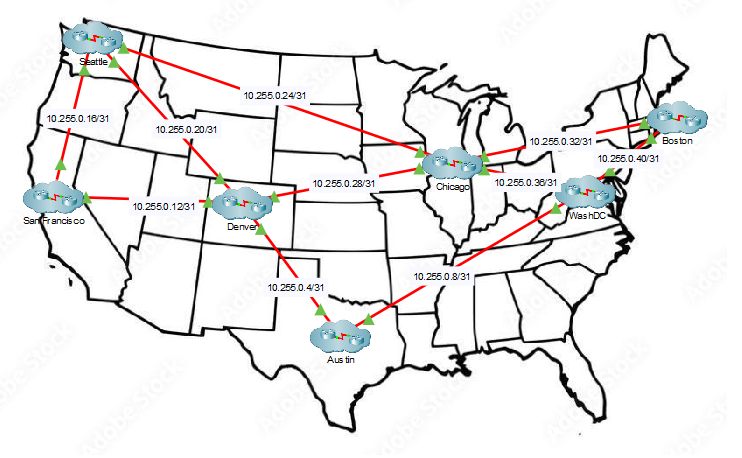
The network is set up in a partial mesh configuration, with 2-4 connected campuses per site (via Fiber) and 2 internal connections (via copper cabling).
| Device Name | Interface | IP Address | OSPF Info (Process, Area) | Router ID |
|---|---|---|---|---|
| WashDC-RT | G0/0 | 1.1.1.1/24 | (1,0) | 1.1.1.1 |
| DC-RT | G0/1 | 2.2.2.2/24 | (1,0) | |
| DC-RT | G0/2 | See Network Map | (1,1) | |
| ATL-RT | G0/0 | 1.1.1.2/24 | (1,0) | 3.3.3.1 |
| ATL-RT | G0/1 | 3.3.3.1/24 | (1,0) | |
| ATL-RT | G0/2 | See Network Map | (1,1) | |
| AUS-RT | G0/0 | 4.4.4.1/24 | (1,0) | 4.4.4.1 |
| AUS-RT | G0/1 | 3.3.3.2/24 | (1,0) | |
| AUS-RT | G0/2 | See Network Map | (1,1) | |
| LA-RT | G0/0 | 4.4.4.2/24 | (1,0) | 5.5.5.1 |
| LA-RT | G0/1 | 5.5.5.1/24 | (1,0) | |
| LA-RT | G0/2 | See Network Map | (1,1) | |
| SLC-RT | G0/0 | 7.7.7.1/24 | (1,0) | 7.7.7.1 |
| SLC-RT | G0/1 | 5.5.5.2/24 | (1,0) | |
| SLC-RT | G0/2 | See Network Map | (1,1) | |
| SEA-RT | G0/0 | 7.7.7.2/24 | (1,0) | 8.8.8.1 |
| SEA-RT | G0/1 | 8.8.8.1/24 | (1,0) | |
| SEA-RT | G0/2 | See Network Map | (1,1) | |
| MIN-RT | G0/0 | See Network Map | (1,1) | 9.9.9.1 |
| MIN-RT | G0/1 | 8.8.8.2/24 | (1,0) | |
| MIN-RT | G0/2 | 9.9.9.1/24 | (1,0) | |
| NYC-RT | G0/0 | See Network Map | (1,1) | 2.2.2.1 |
| NYC-RT | G0/1 | 2.2.2.1/24 | (1,0) | |
| NYC-RT | G0/2 | 9.9.9.2/24 | (1,0) |
As shown above on the map, the IP Addressing follows a scheme where each campus branch has its own IP Network (ex: Austin branch has a network of 10.20.0.0/16). From there, the third octet is assigned to the VLAN (ex: VLAN 70 in the Austin office would have a network of 10.20.70.0/24). From there the last IP octet is dedicated to the host.
Most of the IPs are handed out via DHCP (Dynamic Host Configuration Protocol) either through the CORE1 router or a specific-site server, but there are a couple of static IPs (listed below) for critical services:
| Server Name | IP Address | Subnet Mask | Default Gateway |
|---|---|---|---|
| Web-Server | 10.20.60.5 | 255.255.255.0 | 10.20.60.1 |
| File-Server | 10.20.60.6 | 255.255.255.0 | 10.20.60.1 |
| Backup_Server_1 | 24.24.24.2 | 255.255.255.0 | 24.24.24.1 |
| Backup_Server_2 | 24.24.24.2 | 255.255.255.0 | 24.24.24.1 |
BGP EIGRP HSRP
There will be two main WiFi Networks: HNS-Employees and HNS-Guest at each of the branches. The details are documented below:
| Network Name | Password | 2.4 GHz Channel |
|---|---|---|
| HNS-Employees | tiYLkcO0YnN07^ | 1 |
| HNS-Guest | None | 11 |
| VLAN Name | VLAN ID |
|---|---|
| Wired/PC | 10 |
| WiFi | 20 |
| Office-Devices | 30 |
| Management | 40 |
| Voice-Traffice | 50 |
| Servers | 60 |
| Native | 75 |
| unusedPorts | 200 |
All etherchannels are configured in PAgP (Cisco proprietary EtherChannel protocol)
| Interface Range | Group Number |
|---|---|
| f0/1-3 | 1 |
Login Block (Router ONLY)
*All login blocks will be set for the following format:
login block-for [180 seconds] attempts [3] within [60 seconds]
Network Address Translation (Router ONLY)
Configuration items TBD
Access Control Lists (Router ONLY)
Configuration items TBD
Switchport Security (Switch ONLY)
Configuration items TBD
Console/Enable Mode Passwords are configured on network equipment and follow this format (in lowercast): [SITE][EDGE, CORE, or SWITCH][en] ex: auseden would be for Austin's edge switch
While this format isn't really secure, this is meant to be for demonstration purposes as well as make network configuration easier.
| Console Mode Password | Device Name | Enable Mode Password |
|---|---|---|
| Con-NYCRT | NYC-RT | Enb-NYCRT |
| Con-NYCS1 | NYC-S1 | Enb-NYCS1 |
| Con-NYCS2 | NYC-S1 | Enb-NYCS2 |
| Con-NYCS3 | NYC-S3 | Enb-NYCS3 |
| Con-NYCS4 | NYC-S4 | Enb-NYCS4 |
| Con-DCRT | DC-RT | Enb-DCRT |
| Con-DCS1 | DC-S1 | Enb-DCS1 |
| Con-DCS2 | DC-S2 | Enb-DCS2 |
| Con-DCS3 | DC-S3 | Enb-DCS3 |
| Con-DCS4 | DC-S4 | Enb-DCS4 |
| Con-LART | LA-RT | Enb-LART |
| Con-LAS1 | LA-S1 | Enb-LAS1 |
| Con-LAS2 | LA-S2 | Enb-LAS2 |
| Con-LAS3 | LA-S3 | Enb-LAS3 |
| Con-LAS4 | LA-S4 | Enb-LAS4 |
| Con-LAS5 | LA-S5 | Enb-LAS5 |
| DEN-EDGE | deneden | |
| DEN-CORE1 | denco1en | |
| DEN-CORE2 | denco2en | |
| DEN-SW1 | densw1en | |
| DEN-SW2 | densw2en | |
| AUS-EDGE | auseden | |
| AUS-CORE1 | ausco1en | |
| AUS-CORE2 | ausco2en | |
| AUS-SW1 | aussw1en | |
| AUS-SW2 | aussw2en | |
| Con-SLCRT | SLC-RT | Enb-SLCRT |
| Con-SLCS1 | SLC-S1 | Enb-SLCS1 |
| Con-SLCS2 | SLC-S2 | Enb-SLCS2 |
| Con-SLCS3 | SLC-S3 | Enb-SLCS3 |
| Con-SLCS4 | SLC-S4 | Enb-SLCS4 |
| Con-SEART | SEA-RT | Enb-SEART |
| Con-SEAS1 | SEA-S1 | Enb-SEAS1 |
| Con-SEAS2 | SEA-S2 | Enb-SEAS2 |
| Con-SEAS3 | SEA-S3 | Enb-SEAS3 |
| Con-SEAS4 | SEA-S4 | Enb-SEAS4 |
| Con-MINRT | MIN-RT | Enb-MINRT |
| Con-MINS1 | MIN-S1 | Enb-MINS1 |
| Con-MINS2 | MIN-S2 | Enb-MINS2 |
| Con-MINS3 | MIN-S3 | Enb-MINS3 |
| Con-MINS4 | MIN-S4 | Enb-MINS4 |