- The graph is responsible for dynamically generating and displaying player choices during the narrative. When the dialogue engine reads a [Choice] command from the script, it uses a String Split node to break the single line of text into an array of separate data points. The graph then uses List: Get Item nodes to extract specific segments, which contain the actual text for options. These extracted strings are fed directly into TextMeshPro: Set Text nodes to update the UI buttons. Finally, the execution flow triggers a Game Object: Set Active node targeting the choicePanel variable, making the entire choice interface visible to the player.
- In the new breakdown, I specified the NPC's internal logic by expanding it into an "Emotion State Machine". It works by executing specific logic within each state block. For example, during the Pacing state, it uses an On Update node combined with a sine wave calculation to make the NPC continuously walk back and forth. When transitioning to the Angry state, the On Enter State node instantly halts the movement and activates a hidden UI explosion graphic behind the character. Also, I deleted some of the useless attributes for the player. The most significant architectural update is how this State Machine interacts with the Dialogue/Narrative Engine. Instead of hardcoding state transitions within the state machine itself, it is driven by the dialogue text file. When the player clicks to advance the conversation, the Dialogue Engine parses the .txt script. If it detects a custom tag like [Event]|GoAngry, a String Split node isolates the command and fires a Trigger Custom Event aimed directly at the NPC's GameObject. The NPC's State Machine listens for this specific signal to transition between states.

-
I am building a multi-scene, narrative-driven transition system that bridges the Main Menu, an animated lore introduction, a Level Selection UI, and an MP4 video cutscene before dropping the player into the gameplay level
-
Implement the Interactive Intro Cinematic (Scene: IntroScene)
- Set up a UI Canvas with two distinct Canvas Group objects to separate the cosmic narrative text from the character sprite reveal.
- Utilize Unity's Animation window to record a timeline, keyframing the Alpha values of the Canvas Groups to create a smooth fade-in/fade-out cinematic sequence.
- Create a full-screen, invisible UI Button with its Text component deleted.
- Use Visual Scripting to link the invisible button's On Click event to SceneManager.LoadScene, allowing the player to click anywhere to proceed to the Level Select scene.
-
Develop the Audio Manager (Cross-Scene)
- Extract the Audio Source from the Start Menu's Main Camera and place it on a newly created, dedicated BGM_Manager GameObject.
- Assign a custom Unity Tag to the manager to make it identifiable across different scenes.
- Create a Visual Scripting graph on the manager to enforce a Singleton pattern: check if another object with the tag exists; if not, execute DontDestroyOnLoad.
- Build a "Music Assassin" prefab using Visual Scripting (Find With Tag -> Destroy) and place it in the target gameplay/transition scenes to kill the global music.
-
Integrate the Video Transition (Scene: TransitionScene)
- Get the mp4 video file from source and place it in the Unity StreamingAssets folder.
- Create a new scene with a Video Player component attached to the Main Camera, set to render on the Camera Near Plane to ensure full-screen playback.
- Implement dual-exit logic via Visual Scripting: a Coroutine timer (Wait For Seconds) that auto-loads the "Belobog" scene when the video ends
-
-
Yes, the breakdown activity was incredibly helpful because it forced me to plan the architecture of a complex cross-scene feature (global audio and WebGL video) before coding, saving me from major debugging headaches like overlapping audio tracks. To improve future breakdowns, I would make the steps more technically granular by specifying exact Visual Scripting nodes.
-
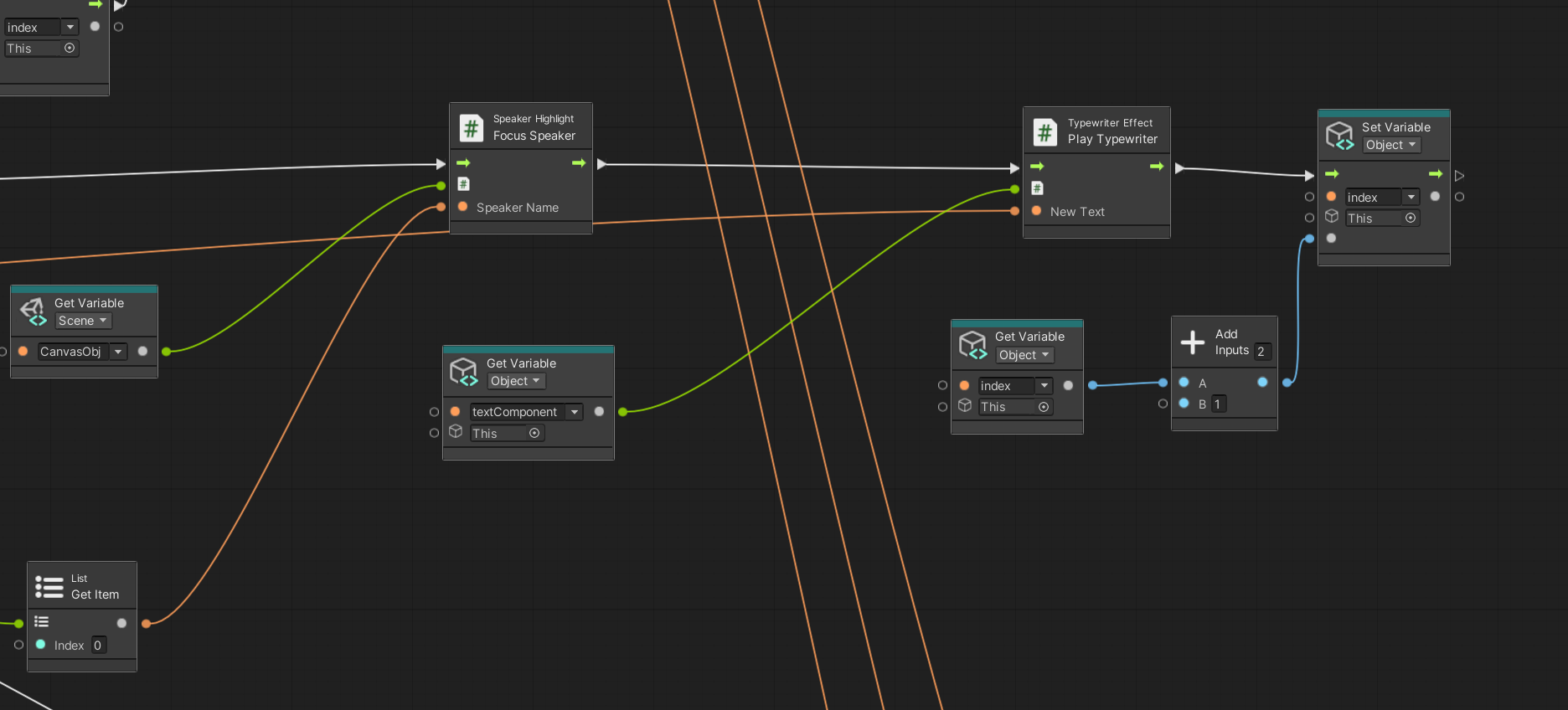
I call C# methods directly from my Visual Scripting graph using InvokeMember nodes. Specifically, my dialogue graph calls the PlayTypewriter() method in TypewriterEffect.cs to animate text, and the FocusSpeaker() method in SpeakerHighlight.cs to highlight the active character's portrait. It delegates complex implementation details to C#, where such logic is much more efficient and natural to write than in a node graph.
-
For Feature (3), please grade my Cross-Scene Global Audio System, which uses a Visual Scripting Singleton pattern to persist music and a KillBGM logic to dynamically destroy it when local audio takes over. You can find the persistent logic attached to the BGM_Manager in the StartMenu scene, and the destruction logic on the KillBGM object in the Belobog scene.
-
Instead of using static textures, this Unlit URP shader generates the blizzard dynamically in the Fragment stage by manipulating UV coordinates. It works by taking a base wind speed and applying standard Time for the downward fall, alongside Sine Time to create a horizontal, wobbling turbulence. These are combined to drive a Tiling And Offset node, which scrolls the UVs through a Voronoi noise generator. Finally, I use One Minus to invert the noise and a Power node to heavily increase the contrast, sharpening the blurry cells into distinct, swaying snowflakes
You can find it under Assets/Shader, called BelSnow, another BelSnow 1 is using the regular time instead of Sine time. This shadergraph material is used in the Belobog scene and fully covered for snow

- For the intro part, I delete the mouse click to skip logic and replace it with a timer based auto transition, since many of my playtesters actually skipped it by mistake, and playtesters suggested that to make the snow direction more dynamic.
- I add the snow, like the one I said in the first question, and I add a shake when the guard is angry, more update will be finished before the final.
-
Our core gameplay design centers around a visual novel. Originally, our planned core loop was: interacting with NPCs -> prompting NPCs to drop specific items -> players collecting and synthesizing these items -> unlocking deeper interactions. Although the complete loop of item dropping, collecting, and synthesizing was not fully implemented in this Vertical Slice, we successfully developed the foundational dialogue engine, dynamic branching narrative, and the core UI framework. This implemented content still clearly illustrates the full game's vision to the player: it establishes the narrative-driven and choice-based nature of the game, setting the stage for the depth of interaction that will be present once the complete item synthesis and progression systems are fully integrated.
-
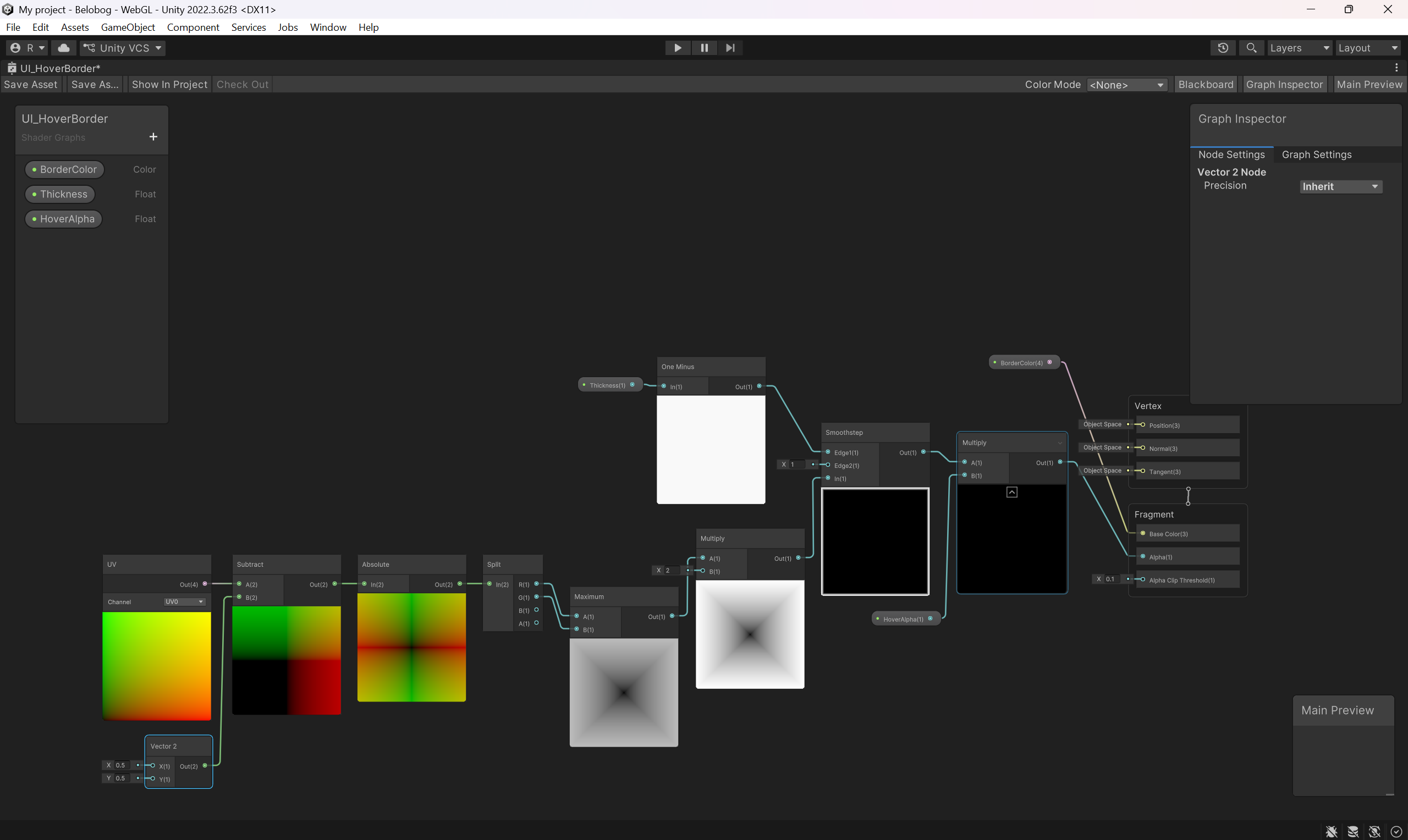
Our UI hover glow border effect is activated directly from player interaction logic using Unity's Event System and a custom C# script. The script is attached to the button's Image child object and inherits from the IPointerEnterHandler and IPointerExitHandler interfaces. When the player hovers over the button, the script triggers an event and the Update() function calculates a smooth alpha transition, passing it to our custom Sprite Unlit Shader Graph. The script instantiates an independent material instance in Start(). Inside the Shader Graph, this alpha value is multiplied by an SDF (Signed Distance Field) border mask calculated in real-time using UV coordinates and a Smoothstep node
-
When breaking down a large project, I prefer combining bubble diagrams with step-by-step task breakdowns. I plan to continue using bubble diagrams because they intuitively map out the data flow and dependencies between different modules, such as Player states, NPC interactions, and underlying Systems. This planning process heavily influenced our Vertical Slice and highlighted a weakness because our workload estimation was overly optimistic. Consequently, we couldn't implement those features due to time constraints. This outcome taught me that future development requires much stricter task breakdowns.