Folders and files
| Name | Name | Last commit date | ||
|---|---|---|---|---|
Repository files navigation
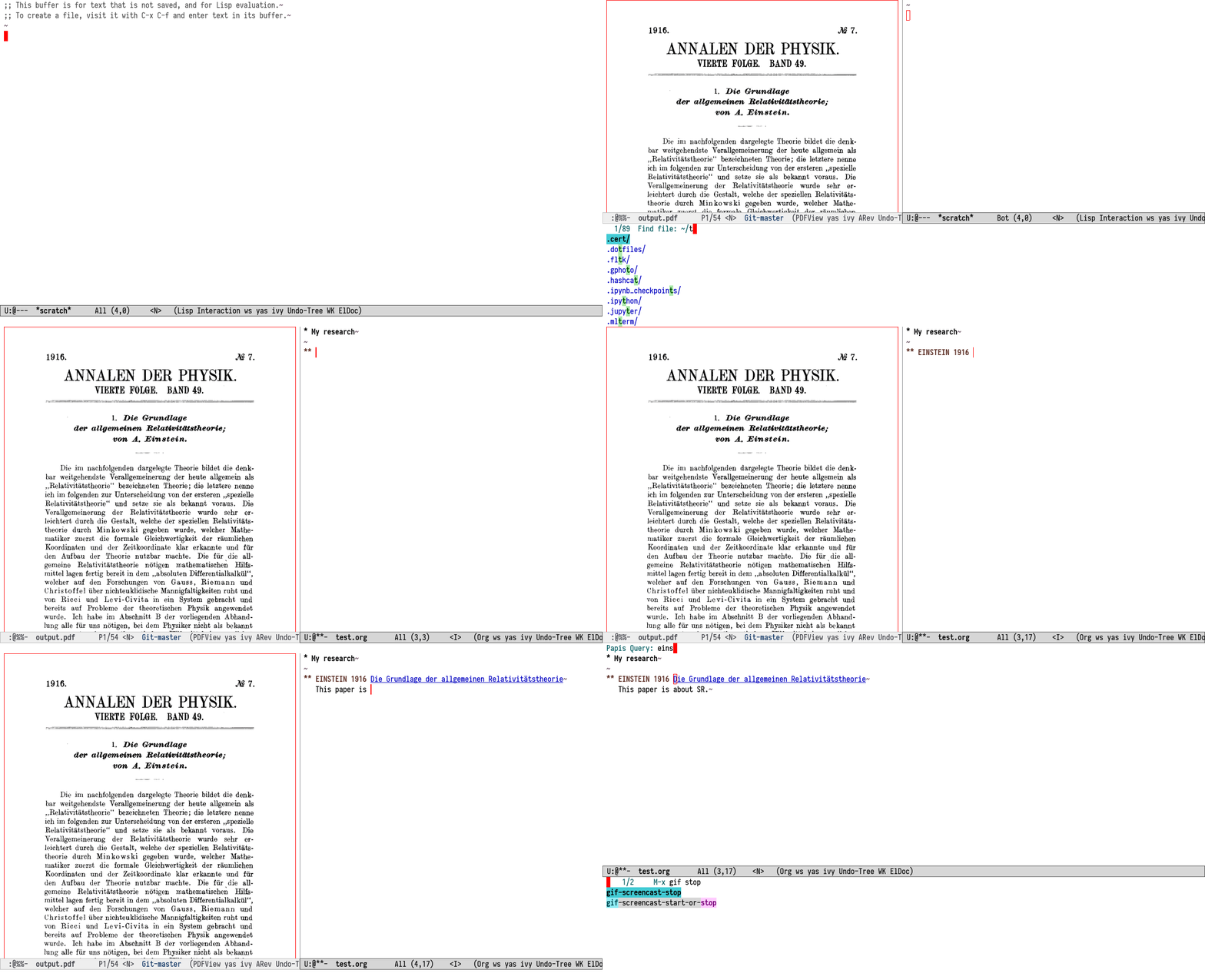
#+title: Papis.el: Use your Papis library from Emacs #+OPTIONS: todo [[https://papis.github.io/images/emacs-papis.gif]] * Motivation The main motivation of this package is to use Papis libraries within the well-established bibliographic ecosystem in Emacs. In particular, the aim is to integrate Papis with =org-cite= (distributed with Emacs) and [[https://github.com/emacs-citar/citar][Citar]]. [[https://github.com/jkitchin/org-ref][=org-ref=]] compatibility is partial; contributions welcome. =papis.el= should also work well with the modern completion stack (=vertico=, =orderless=, etc.). * Installation There are in fact two packages: 1. =papis= implements most of the functionality, defines the customization variables and provides user-facing commands. 2. =papis-citar= provides compatibility with =citar=. ** TODO Release to MELPA Releasing the package on MELPA will make installation easier for users. ** Install with a Nix configuration from this repository Add something like this to your nix configuration for emacs: #+begin_src nix { pkgs ? import <nixpkgs> {}, papis-el-src ? pkgs.fetchFromGithub { owner = "papis"; repo = "papis.el"; rev = "master"; hash = ""; # Set this to the hash given by nix }, }: let my-emacs-pkg = with pkgs; emacsPackages.withPackages (emacsPackages: let papis-el = callPackage "${papis-el-src}/papis.nix" { inherit pkgs emacsPackages; }; papis-citar-el = callPackage "${papis-el-src}/papis-citar.nix" { inherit pkgs emacsPackages papis-el; }; in [ papis-el papis-citar-el # ... your other emacs packages ]); in # This line lets you use emacs with papis in a nix-shell: pkgs.mkShell { buildInputs = [ my-emacs-pkg ]; } # Otherwise, use the emacs package in your configuration: # environment.systemPackages = [ my-emacs-pkg ]; # Or use the emacs service: # services.emacs = { enable = true; package = my-emacs-pkg; }; #+end_src Note: Also add Papis to your system packages. * Basic configuration Here's a basic configuration for your =.emacs= / =init.el=: #+begin_src emacs-lisp (use-package papis :bind-keymap ("C-c p" . papis-command-map) :config (setq papis-export-bibtex-file (make-temp-file "example-lib" nil ".bib") ; Or path of your choice ;; The bibtex file is for org-cite and citar. org-cite-global-bibliography (list papis-export-bibtex-file) citar-bibliography (list papis-export-bibtex-file)) (papis-export-bibtex) ; Export the bibtex to the new temp file. ;; Consider reusing the same bibfile instead, to speed up loading. ) (use-package papis-citar :after citar :config (papis-citar-setup)) #+end_src See the ~defcustom~s in [[./papis.el]] for more configuration options: #+begin_src bash :exports results :results list grep defcustom papis.el | cut -d " " -f 2 #+end_src #+RESULTS: - papis-program - papis-library - papis-extra-options - papis-export-bibtex-file - papis-skip-program-check - papis-completion-format-function - papis-after-open-note-functions * How-to / Commands ** Exporting a bibtex file from your library Some parts of the current =org-cite= and Citar integrations rely on having the bibliographic data available in a =.bib= file. We make this easier with the ~papis-export-bibtex~ command (bound to =C-c p x= in the basic configuration), which exports your Papis library to the file path set in the variable ~papis-export-bibtex-file~. Add this file to the list ~org-cite-global-bibliography~ for =org-cite=, and to the list ~citar-bibliography~ for Citar. ** Insert a citation To insert a citation from your Papis library, you can either: - Use ~org-cite-insert~ (usually bound to =C-c C-x @=), with the =org-cite='s ~'basic~ insert processor. - Use the same command, but set =org-cite= insert processor to ~'citar~. - Use ~citar-insert-citation~. The first option requires the =org-cite= to access the exported bibtex. ** Opening links, notes and PDFs (or other files) Use ~papis-browse~ (=C-c p b=, for links), ~papis-notes~ (=C-c p n=, for notes), or ~papis-open~ (=C-c p o=, for attached files). Citar has comparable commands, but the Papis commands will suggest a contextually appropriate default: the document cited at point or, when inside a document's directory, that document. Another way to open a link, note or file related to the citation at point is to type =C-c C-o= (~org-open-at-point~), using the ='citar= follow processor for org-cite. *** Creating notes When calling ~papis-notes~, notes are automatically created in the the Papis document's folder with the name and template from your Papis configuration. For example, insert the following lines to your Papis =config=: #+begin_src text notes-name = notes.org notes-template = ./notes-template.org #+end_src ...and include the following template at the configured path: #+begin_src org :tangle ./notes-template.org ,#+TITLE: Notes about "{doc[title]}" TODO [cite:@{doc[ref]}]. ,#+print_bibliography: #+end_src You can also [[https://www.gnu.org/software/emacs/manual/html_node/elisp/Setting-Hooks.html][add functions]] to the variable ~papis-after-open-note-functions~, which is an "abnormal" hook, because it takes arguments: 1. ~DOC~ : The ~papis-notes~ function passes in a hashtable containing the document's metadata. The Citar integration doesn't have it on hand, but your hook can obtain it easily with ~papis--query-documents~ and the note's directory. 2. ~NEW~ : This boolean indicates that the note has just been created, and thus provides an alternative way to fill a template for a new note. The default ~papis-after-open-note-functions~ jumps to the first =TODO= iff there is one. ** Edit a document's metadata (Papis' =info.yaml= file) The command ~papis-edit~ (=C-c p e=) opens the =info.yaml= file and enters the ~papis-edit-mode~, which simply binds ~papis-cache-update~ to =C-c C-c=. The command ~papis-cache-update~ (=C-c p u=) makes Papis update its database, which caches the metadata from a library's file hierarchy. Consider also running ~papis-export-bibtex~ to make changes visible to the =org-cite= export processors. ** Adding documents to the library The ~papis-add~ command (=C-c p a=) allows you to run ~papis add~ directly from emacs (using ~term-mode~), and fills-in the url at point, if there is one. * Compatibility with other software ** Org-mode links =papis.el= sets up a type of org-mode link for Papis documents that references documents by ID. ** [[https://melpa.org/#/org-noter][org-noter]] compatibility We have found that papis works quite well with =org-noter= since like Papis, it looks for notes in the same directory as the annotated document. When opening a =pdf= file of a papis document you can just type =M-x org-noter= and if there is =notes.org= file in there then =org-noter= will open a session for you. Of course your notes file should be an org file, which you can do by setting [[https://papis.readthedocs.io/en/latest/configuration.html#config-settings-notes-name][notes-name]] equal to =notes.org= in your papis configuration. Set the note file name for =org-noter= in ~org-noter-default-notes-file-names~ to match. You can adjust the note template so that it contains a heading with the ~NOTER_DOCUMENT~ property set to the document's filename (see below). This makes it possible to open =org-noter= from the notes file as well. #+caption: A template linking PDFs for =org-noter= #+begin_src org ,#+TITLE: Notes about "{doc[title]}" ,* Notes :PROPERTIES: :NOTER_DOCUMENT: {doc[ref]}.pdf :END: TODO [cite:@{doc[ref]}]. ,#+print_bibliography: #+end_src ** [[https://github.com/nobiot/org-transclusion][org-transclusion]] compatibility You can put this into your configuration file in order to let =org-transclusion= know about papis: #+begin_src emacs-lisp (require 'cl-lib) (defun papis-org-transclusion-add-papis-id (link plist) (when (string= "papis" (org-element-property :type link)) (let* ((id (org-element-property :path link)) (query (format "papis_id:%s" id)) (notes-path (papis--ensured-notes-path query)) (new-link (with-temp-buffer (insert "file:") (insert notes-path) (beginning-of-buffer) (org-element-link-parser)))) (org-transclusion-add-org-file new-link plist)))) (cl-pushnew 'papis-org-transclusion-add-papis-id org-transclusion-add-functions) #+end_src Then, you can transclude multiple notes to a single Org file with something like: #+begin_src org ,* Important papers ,#+transclude: [[papis:d27eac97f9dab8e63d1ceeddc41bb8ff][This and that paper]] :expand-links ,#+transclude: [[papis:0858c8b2885089446f1647ad9bb80a41][A fifth-order perturbation comparison of electron correlation theories]] :expand-links #+end_src And to add these kind of lines you can use this function: #+begin_src emacs-lisp (defun papis-transclusion-insert (doc) (interactive (list (papis--read-doc))) (insert "#+transclude: [[papis:") (insert (papis--doc-id doc)) (insert "][") (insert (papis--doc-get doc "title")) (insert "]]") (insert " :expand-links") (org-transclusion-add)) #+end_src ** Paper sections When doing research, often you would like to create some notes on every paper and write some sections with the section titles being links to the papers with some properties so that you can use org-mode's colum mode. You can add a function like the following to your configuration, to create a heading with a link and properties: #+begin_src emacs-lisp (defun papis-org-insert-heading (doc) (interactive (list (papis--read-doc))) (let ((title (papis--doc-get doc "title")) (author (papis--doc-get doc "author")) (year (papis--doc-get doc "year")) (doi (papis--doc-get doc "doi")) (papis-id (papis--doc-id doc))) (org-insert-heading) (insert (format "[[papis:%s][%s]]" papis-id title)) (org-set-property "PAPIS_ID" papis-id) (org-set-property "AUTHOR" author) (org-set-property "TITLE" title) (org-set-property "YEAR" (format "%s" year)) (org-set-property "DOI" doi))) #+end_src A recommendation can be to write as the =COLUMNS= variable and the =PROPERTIES= like so: #+begin_example #+COLUMNS: %7TODO %5YEAR %10AUTHOR %45TITLE %TAGS #+PROPERTIES: TITLE AUTHOR YEAR #+end_example and then you can turn on the =org-columns= mode. ** =org-ref= compatibility =org-ref= can open the pdf of a publicaction from the =cite:my-reference= link, but in the case of papis this pdf lives in an isolated folder of its own. However in =org-ref= you can customize how you get the pdf from the =cite= link through the elisp:org-ref-get-pdf-filename-function. Therefore, in order to use papis to open the pdf of the referenced documents you can set: #+begin_src emacs-lisp :eval no (setq org-ref-get-pdf-filename-function #'papis-org-ref-get-pdf-filename) #+end_src ** Bibtex entries #+begin_warning Note that this needs the command =papis-exec=, which is available in papis from version =0.12= onwards. #+end_warning Use ~papis-extract-citations-into-dblock~ to insert a ~papis-bibtex-refs~ dynamic block. This block can be dynamically updated with the same function or ~org-dblock-update~ (=C-c C-x C-u=) to list the bibtex code for all the citations in the buffer. * Testing This repository contains an [[./example-lib][example library]] that is used for tests, along with its [[file:papis.config][Papis configuration]]. Tests for both packages can be run in emacs (see the [[file:test/][source files]]), or using nix: #+begin_src bash nix-build ./papis.nix -A tests #+end_src #+begin_src bash nix-build ./papis-citar.nix -A tests #+end_src