

Modern connection manager — SSH, RDP, VNC, SPICE, and more




RustConn is a cross-platform connection orchestrator with a GTK4/libadwaita interface. It brings SSH, RDP, VNC, SPICE, MOSH, Telnet, WinRM, Serial, Kubernetes, Zero Trust and Web connections under one roof — with embedded Rust clients where possible and seamless integration with external tools where needed. Runs on Linux (GTK4/libadwaita), macOS, FreeBSD, and Windows via WSLg.
 |
 |
 |
 |
 |
 |
 |
 |
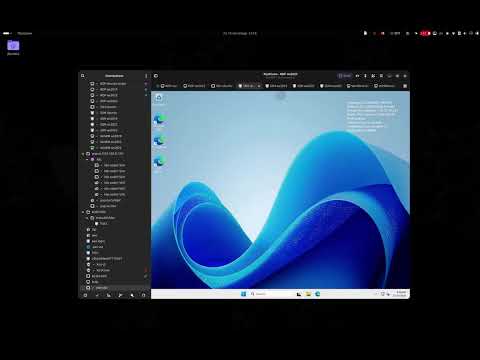
The screenshots show a live demo lab: Windows Server over RDP and WinRM, Linux over SSH and AWS SSM, and a k3s cluster on KVM.
| Category | Details |
|---|---|
| File Transfer | SFTP in the system file manager (sftp:// URI, D-Bus portal) or in Midnight Commander inside a tab; drag and drop files onto sessions |
| Organization | Nested groups (duplicate or move a whole folder), tags, templates, custom icons (emoji/GTK), saved searches, a Trash that keeps deleted items until you empty it, connection history & statistics |
| Monitoring | Remote host metrics bar (CPU, RAM, disk, network, load, system info) — agentless, per-connection toggle |
| Import | Asbru-CM, Remmina, SSH config, Ansible inventory, Royal TS, MobaXterm, SecureCRT, PuTTY/KiTTY (.reg), mRemoteNG (confCons.xml), Remote Desktop Manager, RDP files (.rdp), virt-viewer (.vv), libvirt (XML + daemon), CSV, native (.rcn) |
| Export | Asbru-CM, Remmina, SSH config, Ansible inventory, Royal TS, MobaXterm, SecureCRT, CSV, RDP files (.rdp), native (.rcn) — passwords are never exported |
| Security | KeePassXC (KDBX), libsecret, macOS Keychain, Bitwarden CLI, 1Password CLI, Passbolt CLI, Pass (passwordstore.org), script credentials; encrypted-file fallback with no keyring required (machine-bound or a portable file for use across machines); hardware-token SSH auth (FIDO2 security keys, PKCS#11 / YubiKey / smart cards); FIDO2 passkey redirection for RDP sessions |
| Terminal | Split view that mixes terminals with embedded RDP sessions (split a whole set of tabs in one step), command snippets, text highlighting rules, session recording, custom terminal themes, tab overview, tab pinning, OSC 133 shell integration (prompt navigation + failed-command marker) |
| Session Windows | Move any session (SSH, Telnet, Serial, Kubernetes, MOSH, Zero Trust, embedded RDP/VNC/Web) to its own window and back with Ctrl+Shift+M — per-monitor fullscreen, never reconnects |
| Automation | Run Local Script on many hosts at once (bash over SSH, PowerShell over WinRM), expect rules, key sequences, pre/post-connect tasks, elevated credentials (sudo/su injection), output filters (ChromaTerm), cluster & ad-hoc broadcast, session reconnect, Wake-on-LAN |
| Networking | Jump hosts (bastions) picked per connection, per group, or as a global default — honoured by SSH, SFTP, RDP, VNC, SPICE and WinRM, with multi-hop chains, fallback jump hosts tried in order, and a per-connection Direct override; Open Browser via Tunnel — one right-click on an SSH host raises a SOCKS proxy and opens a browser (embedded or external Chromium) routed through it, to reach host-only web UIs; Multipath TCP for mobility & bandwidth aggregation (SSH/RDP/VNC), network-change auto-reconnect, port knocking, fwknop SPA; one-click QUIC (quicssh) ProxyCommand preset for SSH over QUIC (connection migration and UDP NAT traversal; quicssh installed separately) |
| Workflow | Smart folders, SSH port forwarding, visual SSH tunnel builder, workspace profiles (save/restore open sessions, including split layout and divider ratio), settings backup/restore, .rdp file association |
| Cloud Sync | Synchronize connections via shared cloud directory (Google Drive, Syncthing, Nextcloud, Dropbox); group sync with Master/Import access model; simple sync with UUID-based merge |
| CLI | rustconn-cli — headless management: list/add/update/delete connections (also in bulk from YAML/JSON), duplicate into numbered ranges, import from every file format above (the libvirt daemon is GUI-only) and export, run local scripts on SSH/WinRM hosts, snippets, groups, templates, clusters, WoL, shell completions, man page, OpenH264 codec download; optional secret and client-launch commands behind features. Changes made with the CLI appear in a running window and are never overwritten by it |
| Languages | English, plus translations into Azerbaijani, Belarusian, Czech, Danish, German, Spanish, French, Italian, Georgian, Kazakh, Dutch, Polish, Portuguese, Slovak, Swedish, Ukrainian, Uzbek, Vietnamese and Simplified Chinese |
| Protocol | Client | Type |
|---|---|---|
| SSH | VTE terminal (port forwarding: -L/-R/-D) | Embedded |
| RDP | IronRDP / FreeRDP fallback (bundled in Flatpak) | Embedded + external |
| VNC | vnc-rs / vncviewer fallback | Embedded + external |
| SPICE | remote-viewer / virt-viewer | External |
| Telnet | VTE terminal | Embedded |
| WinRM | evil-winrm via VTE | External |
| Serial | picocom via VTE | External (bundled in Flatpak) |
| Kubernetes | kubectl exec via VTE | External |
| MOSH | mosh via VTE | External |
| Zero Trust | AWS SSM, GCP IAP, Azure Bastion, Azure SSH (AAD), OCI, Cloudflare, Teleport, Tailscale, Boundary, Hoop.dev | External |
| Web | Embedded WebKitGTK 6.0 browser (Linux) / System browser / Custom browser command | Embedded + external |


| Method | Command / Link |
|---|---|
| Flatpak (recommended) | flatpak install flathub io.github.totoshko88.RustConn |
| Snap | sudo snap install rustconn (permissions) |
| macOS (Homebrew) | brew tap totoshko88/rustconn && brew install rustconn |
| Debian 13 / Ubuntu 24.04 / Ubuntu 26.04 | OBS apt repository (setup) |
| openSUSE (Tumbleweed, Slowroll, Leap 16.0) | OBS zypper repository (setup) |
| Fedora 43 / 44 | OBS dnf repository (setup) |
| Arch Linux | yay -S rustconn (AUR, community) |
| FreeBSD | pkg install rustconn (ports, community) |
| AppImage | GitHub Releases |
| Windows (WSL2) | Runs under WSLg (guide) |
| From source | Rust 1.95+, GTK4 4.14+ (build guide) |
| Nix (flake) | nix profile install github:totoshko88/RustConn or add to your flake inputs |
Files attached to a GitHub release carry a signed build-provenance attestation —
verify a download with
gh attestation verify <file> --repo totoshko88/RustConn
(details).
Keyboard shortcuts are customizable in Settings → Keybindings; press Ctrl+?
in the app for the complete, always-current list.
RustConn is published through these channels only:
| Channel | Where |
|---|---|
| GitHub Releases | totoshko88/RustConn releases; the deb, rpm, AppImage and Flatpak files carry a build-provenance attestation |
| Flathub | io.github.totoshko88.RustConn |
| Snap Store | rustconn |
| openSUSE Build Service | home:totoshko88:rustconn: Debian, Ubuntu, openSUSE and Fedora repositories |
| Homebrew tap | totoshko88/rustconn |
| AUR | rustconn (community-maintained) |
| FreeBSD ports | net/rustconn (community-maintained) |
| Nix flake | github:totoshko88/RustConn |
Forks of RustConn are not affiliated with this project. If your build came from a fork, report its bugs in that project's own tracker. The issue tracker here covers the builds above, builds from this repository's source, and packages from other distributions (for example nixpkgs, Debian or Fedora), which are not forks.
| Document | Description |
|---|---|
| User Guide | Complete usage documentation |
| Installation | All installation methods and repository setup |
| Build Guide | Building from source, feature flags, per-distro prerequisites |
| macOS Build | Building and running on macOS, Homebrew, DMG packaging |
| Windows / WSL2 | Running RustConn on Windows via WSLg |
| CLI Reference | rustconn-cli commands and examples |
| Architecture | Crate structure and design decisions |
| CI & Build Flow | CI pipelines, OBS packaging, Flathub release process |
| Zero Trust | Setup guides for each supported Zero Trust provider |
| Changelog | Release history and notable changes |
CONTRIBUTING.md covers development setup, the quality gate, and the conventions a pull request is checked against. Participation is under the Code of Conduct.
- Bugs and features — issue tracker; the forms ask for the version, install method, and desktop, which is usually what a diagnosis turns on.
- Questions — Discussions.
- Code — see the Build Guide and Architecture to get started.
- Translations — RustConn ships every catalogue listed in
po/LINGUAS; the.pofiles live inpo/. New languages and corrections are appreciated; which languages the project ships is in CONTRIBUTING.md. - Vulnerabilities — privately, via Security Advisories rather than an issue (SECURITY.md).
RustConn follows the GNOME Code of Conduct. It applies to everyone taking part in the project's issues, pull requests, discussions and code review. To report a problem, write to the maintainer at totoshko88@gmail.com or contact the GNOME Code of Conduct Committee. See CODE_OF_CONDUCT.md for details.


GPL-3.0-or-later — Made with ❤️ in Ukraine 🇺🇦
From release 0.24.11, the author's own material carries additional terms under GPL-3.0 section 7 (author attribution, the origin of modified versions, and the use of the name), set out in NOTICE.